
| V Guided Tour: Hex Mode | ||||||||||||||
| Home | | |
Features |
| | Guided Tour | | | Download | | |
Buy Now Only $20! |
| |
Support & FAQs |
| | Contact | ||
| < Previous | Next > |
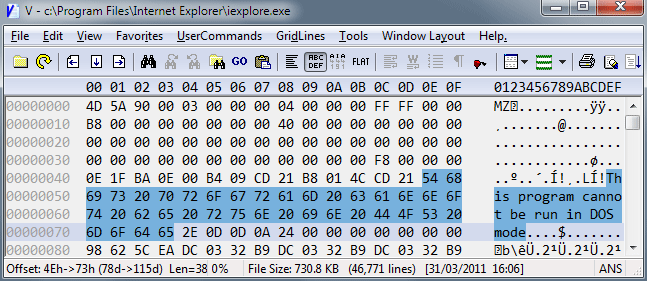
The screen shot below shows V displaying a file in hex mode.
|
Word Format (16 bit)
Double Word Format (32 bit) |
| In Word and DWord mode, the "ends" of each Word/DWord may be "flipped". This makes it easier to view data that is stored in little-endian format. |
|
Vertical Hex Mode
|
|
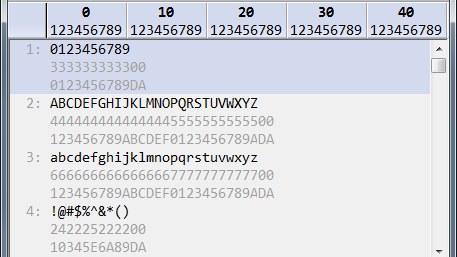
Vertical Hex Mode is a combination of Text and Hex mode.
The file is displayed one line at a time (as in text mode), however each line is followed by 2 lines
containing the hex code of each corresponding character.
The 2 lines need to be read vertically. That is, the first line contains the first nibble (4 bits) of the character and the second line contains the second nibble. In the example above, the first character in line 1 is ZERO, which is 30 in hex. Therefore, the first character on the line below is 3 and the first character on the next line is 0. |
| < Previous | Next > |

